
The best POS for food truck operations does more than take payments. It moves lines faster. It keeps orders flowing when the signal drops. It handles modifiers in two taps, not ten. It sets up in minutes and survives heat, grease, and bumps. Speed drives sales per hour. Offline reliability protects revenue at festivals. Quick-modifier workflows cut errors. Simple setup reduces training time and costs. The right food truck POS systems deliver all four.
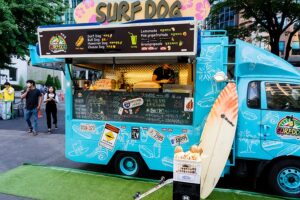
This guide compares the top mobile POS for food trucks by budget, menu complexity, and growth plan. Square for Restaurants fits startups and pop-ups that need fast setup and low upfront cost. Toast serves high-volume trucks with complex kitchen flows. Clover suits concepts that sell both food and merch or plan franchise playbooks. TouchBistro favors offline-first iPad simplicity. Revel powers multi-truck fleets that need advanced reporting and tight control. Use these picks to match your truck’s pace and plans — and keep the window moving.
Square for Restaurants (Best for startups and pop-ups)
Square for Restaurants fits early-stage trucks that need to launch fast and keep lines moving. Setup takes hours, not days, and the free entry plan lowers risk for proof-of-concept runs. Handhelds enable true line-busting at festivals and brewery pop-ups; take orders and payments curbside while the window keeps firing. A typical pop-up can run two handhelds and a kitchen printer, accept tap-to-pay, and print tickets in minutes without a complex buildout — an immediate win when trying to validate a menu or location.
Operational tools cover the essentials without clutter. Item modifiers handle size, spice, and add-ons in one tap, which speeds ordering for high-customization menus like tacos or boba. QR code payments let crews collect from customers even when the counter is slammed or when splitting checks across friends. As an offline mode POS, Square keeps taking card payments during spotty service; tickets queue and sync when the truck reconnects. Basic inventory tracks key items and 86ing, so staff can remove sold-out toppings mid-rush and avoid rework.
Kitchen workflows work well for a compact footprint. Square supports kitchen printers and simple KDS setups so the grill, fryer, and expo see clean tickets and modifiers. Preconfigure taxes and tipping to match each city’s rules on a multi-stop route. For teams that rotate staff, the interface reduces training time and cuts order errors, which matters when every second in a lunch rush counts.
Cost structure is straightforward and friendly to cash flow. Software ranges from $0–$60 per location per month with built-in Square processing and month-to-month terms. Hardware costs stay low with iPads and Square Readers, and upgrades remain optional as volume grows. For a quick POS pricing comparison, startups will find Square’s pay-as-you-go model competitive on small tickets and variable schedules. For many first-time operators, this balance of speed, offline reliability, and simple pricing makes Square a top contender for the best pos for food truck.
2. Toast (Best for high-volume trucks with kitchen complexity)
We recommend Toast when a truck runs at peak volume and the kitchen needs tight control. Toast’s Android hardware holds up to heat, grease, and the bumps of service. Its KDS routes orders by station, fires items on timers, and highlights rush tickets, which cuts misfires at the window. Toast Offline Mode keeps orders and payments flowing when cell service drops in a stadium lot or a crowded festival corridor.
Use Toast to speed complex menus with excellent modifier workflows. Build protein, spice level, and add-on trees that staff can tap fast without scrolling. Set item-level prep times so the grill and fryer stay in sync. For a burger truck with a second expo window, Toast’s KDS can color-code “hold fries” or “no bun” calls and auto-bump when sides finish. That reduces chatter and keeps a 60-second ticket time within reach.
Toast also scales beyond the window. Activate online ordering, curbside, and loyalty to capture pre-orders before lunch rush. Enable contactless payments food truck workflows so guests tap and go at the window or on handhelds in a long line. Multi-location tools help fleets mirror menus, push 86s in real time, and roll up sales, labor, and product mix into centralized dashboards — useful when you run two trucks at a brewery residency and another at a stadium.
Budget for Toast’s ownership model. Pricing typically runs $0–$69+ per terminal per month, requires Toast hardware and processing, and often comes with long-term contracts. Plan your total cost by combining software, terminals, a KDS screen, and payment rates on your average ticket and volume. If you need deeper inventory management POS controls, add Toast modules or third-party integrations; align those add-ons with forecasted throughput so you pay for speed that your team can use today.
4. TouchBistro (Best offline-first iPad POS with simple menus)
TouchBistro fits trucks that need rock-solid offline reliability and fast, simple ordering. It runs on a local iPad network, so staff can keep taking orders and printing tickets when cell service drops. That matters at festivals, stadium lots, and construction sites where Wi‑Fi is unreliable. Quick-service tools streamline high‑turnover menus. Cashiers can tap popular items, apply modifiers, and fire to the kitchen in seconds.
The platform shines with combo building and upsells at the counter. Build a “Burger + Fries + Drink” bundle with size and sauce modifiers in a single screen. Prompt an add‑on, like bacon or a premium bun, before checkout to lift average ticket. For service models that blend walk‑up with pickup, TouchBistro supports tableside and curbside workflows. Staff can accept orders line‑side on an iPad, 86 items in real time, and route tickets to a kitchen printer or KDS without a connection.
Operations get the basics without bloat. Core inventory tracks counts on staples like tortillas, buns, and sauces. Gift cards and a loyalty programs POS add‑on help drive repeat visits between events. Tip controls support a tip management POS flow with suggested tip prompts, pooled or individual tips, and clean end‑of‑day reports. Multi‑truck support lets owners standardize menus, taxes, and promos across several rigs while keeping permissioned access by location.
Pricing starts around $69+ per terminal per month. It runs on iPad hardware you likely already own, and payment processing goes through partners, including TouchBistro Payments. Budget for card readers, a compact receipt or kitchen printer, and a cellular failover hotspot. Test the local network at a weekend pop‑up, stress‑test offline order taking and printing, and lock in your combo logic and modifier sets before the lunch rush.
5. Revel Systems (Best for multi-truck fleets and advanced reporting)
Revel fits multi-truck operators that need centralized control and enterprise-grade depth. Its always-on mode keeps orders flowing when cellular service drops, while iPad-based terminals pair well with a kitchen display system and a reliable receipt printer for food truck service. We recommend Revel when menu complexity, prep staging, and multi-location visibility drive your operation. Use the multi-location dashboards to compare COGS, voids, and item profitability across trucks in real time.
Deep inventory and prep planning help commissary-first models. Create batch recipes, push par levels to each truck, and set low-stock alerts before the lunch rush. Dayparting supports drive-time menus — serve breakfast burritos from 7–10 a.m., auto-switch to bowls at 11 a.m., and spotlight late-night items after events. Tie KDS routing to stations so fry, grill, and expo stay synchronized, then use item-level prep times and 86ing to keep lines moving.

Open API integrations make Revel a strong candidate for fleets that scale. Connect accounting, payroll, and route-planning tools to automate closeouts and forecast labor by stop. Add loyalty and online ordering without rebuilding your menu. Mount iPads in rugged hardware POS enclosures and secure them with locking stands to handle heat, vibration, and frequent travel. Pair with Bluetooth or Ethernet receipt printers rated for mobile environments, and keep a charged hotspot as a failover.
Expect higher upfront and ongoing costs than starter systems. Pricing typically starts at $99+ per terminal per month, often with a two-terminal minimum and paid onboarding, plus custom processing rates. Budget for hardware, data plans, and implementation time. For fleets, the control and reporting often offset the cost: faster deployments to new trucks, consistent menus, and tighter waste control. For a single truck, consider whether the advanced tooling justifies the total cost, or if a lighter best pos for food truck option fits the stage.
How to Choose the Best POS for Your Food Truck
Start with the work that happens in the truck. Prioritize offline reliability, handheld speed, and modifier workflows over shiny extras. Demand a POS that takes orders and accepts payments when cellular service drops at fairs and stadium lots. Test how quickly a handheld fires a ticket to the kitchen, how modifier screens handle “no onions/add avocado/sauce on the side,” and how fast staff can 86 an item mid-rush. A system that shaves 10–15 seconds per order can clear a 30-person line before halftime.
Run a field test before committing. Simulate dead zones by switching to airplane mode, then take 50 mock orders on a handheld to measure taps-to-ticket and time to first print on the KDS or kitchen printer. Check battery life across a full lunch and dinner service. Confirm that offline transactions queue safely and auto-settle later. Verify EMV compliance for chip and tap, and ensure the provider maintains PCI compliance so card data stays encrypted and tokenized even when the truck is offline.
Compare total cost of ownership, not just sticker price. Add monthly software per location or per terminal, plus any add-ons like KDS, online ordering, loyalty, or advanced reporting. Amortize hardware over 24–36 months (handhelds, printers, cash drawer, LTE hotspot), and include consumables and data plans. Model payment processing with real math: at a $18 average ticket and 1,500 orders, a 2.6% + $0.10 rate costs about $852 per month (1,500 × [0.026 × 18 + 0.10]). Ask for custom pricing if volume is high or ticket sizes vary by event.
Scrutinize contract terms and scalability. Confirm month-to-month vs. multi-year agreements, early termination fees, seasonal pause options, and any PCI or statement fees. Check whether multi-truck discounts apply and how quickly you can spin up a new unit for a festival. Review data access and exports, integration marketplaces, and API availability to avoid lock-in as you add catering, ghost kitchens, or franchise partners. Choose the platform that clears lines faster today and scales without surprise fees tomorrow.
Pricing Snapshot and Total Cost of Ownership
Start with a simple TCO model. Add monthly software, hardware amortized over 24–36 months, and payment processing on your average ticket and volume. For example, a truck running 1,800 orders/month at a $16 average ticket does about $28,800 in card sales. At 2.6% + $0.10 per tap, you will pay about $940 in processing. If software is $60 and hardware is a $1,200 kit amortized over 36 months (~$33/month), your monthly POS cost lands near $1,033. Compare this to an interchange-plus plan at 2.0% + $0.15. On the same volume, processing drops to about $806. If that plan requires $99 software and $70/month for support, the TCO ends up close — so run the math, not just the rate.
Tie hardware choices to usage and lifespan. A rugged handheld and a fast card reader for food trucks reduce line time and mis-swipes, which lowers labor and increases throughput. Amortize each device by expected duty cycle. A $500 handheld that lasts three years costs ~$14/month; two units plus a KDS and printer may total $80–$120/month. Include mounts, battery swaps, and data hotspots. The best POS for food truck operations keeps transacting offline and caches orders; one hour of downtime at a busy festival can cost more than a month of software.
Expose the “below-the-line” fees before you sign. Flag cancellation and early termination penalties, PCI non-compliance charges, address-verification and gateway fees, chargeback fees, and menu management or “premium features” upsells. Some providers bundle “required” hardware or installation that locks you into higher processing. Others gate support behind tiers; 24/7 phone support may add $30–$60/month. If gift cards, loyalty, or online ordering live in add-ons, include them in the TCO. A $0 plan can cost more than a $69 plan once add-ons and processing spread across peak months.
Project seasonality and growth. Model low months and peak months separately, then average across the year so cash flow doesn’t surprise you. If you plan to add a second truck, test multi-location pricing and per-terminal minimums now. Validate how menu management changes affect costs — some platforms charge for additional menus, dayparting, or remote updates. Keep a shared TCO sheet, update it quarterly, and negotiate. Providers will often reduce processing by 5–10 basis points when you show volume, clean chargeback history, and a clear hardware plan.
Implementation Tips and Common Pitfalls
Run a controlled pilot before a full rollout. Use a busy weekend event to simulate festival conditions. Kill the Wi‑Fi on purpose and run entirely on offline mode to confirm queued payments, tip flows, and receipt printing work without a signal. Stress-test the KDS and printers under heat, grease, and vibration; mount screens to reduce glare and verify chits remain legible on 3-inch thermal paper. Add a backup hotspot and battery pack, and confirm automatic failover switches cleanly.
Standardize how staff build orders. Define a single modifier playbook with forced choices, common upsells, and “light/no/add” options that mirror your line workflow. Map taxes by jurisdiction if you cross city lines, and preconfigure event-specific auto-gratuity or service fees. Set item-level prep times so the system staggers fires: fries at 3 minutes, tacos at 6, birria at 10. Enable 86ing with countdowns, so when you have six buns left, the POS stops new bun-based items at five and alerts the expo.
Measure and tune operations with real-time reporting. Track average ticket time, voids, and item sales by hour during the pilot, and rebalance the menu or station staffing before the next shift. If you run two trucks at a festival, use multi-location support to push one menu change to both units, share inventory counts, and compare performance side by side. Export the data into scheduling and purchasing tools on Monday to lock in changes.
Avoid common pitfalls. Do not go live without role-based permissions and a cash management process; set blind drops and limit who can price override. Train on handheld workflows and tap-to-pay to eliminate line clogs; practice split tenders and refunds. Label your network and printer names by station to prevent mismatches under pressure. After the pilot, reconcile queued offline payments against batch totals the same day and document a playbook so the next event runs the same way every time.
Security, Compliance, and Payments
Protect cardholder data with PCI-compliant workflows from day one. Deploy end-to-end encryption and tokenization so raw card data never touches your network. Use EMV and P2PE-certified card readers, even for curbside and line-busting. Lock down access with staff PINs, role-based permissions, and audit logs tied to route and shift management to trace every refund, void, and tip adjustment.
Harden your fraud posture before peak season. Enable AVS and CVV checks for keyed orders, set velocity limits for refunds and voids, and require manager approval for high-risk actions. Turn on chargeback tools: reason-code alerts, automated receipt retrieval, and item-level evidence exports. For pickup-heavy events, capture name-on-order and handoff timestamps; a taco truck in Austin cut chargebacks 38% after adding signed pickup slips and SMS receipts with location stamps.

Optimize for fast, hygienic payments. Enable tap-to-pay and mobile wallets on every terminal, including Tap to Pay on iPhone or Android-based handhelds for queue busting. Configure surcharges or cash discounts in the POS, not at the register, and follow local laws on caps and signage. Set tax rules, service fees, and gratuity prompts by location and daypart so festival pricing, catering minimums, and late-night menus bill correctly without manual edits.
Vet vendors on more than marketing claims. Read POS customer reviews that mention encryption, uptime during offline mode, and real chargeback outcomes. Ask for documentation of PCI scope, P2PE listings, breach response SLAs, and token vault architecture. When choosing the best pos for food truck, compare total processing stacks, dispute win rates, and fraud tool depth, not just rates. Tie payments to operations: integrate staff timecards, tip pools, and route and shift management so end-of-day reconciliation, deposit forecasting, and loss prevention run on rails.
Integrations and Growth Readiness
Treat integrations as core infrastructure. Map must-have connections before you buy: accounting (daily sales, deposits, tips), labor scheduling and timekeeping, online ordering, delivery aggregators, loyalty/CRM, and inventory. Define the data flow for each. For accounting, require automatic, nightly journal entries to your GL with separate lines for sales, taxes, discounts, tips, and fees. For labor, push time punches and sales-per-labor-hour to your scheduler. For online ordering and delivery, sync a single menu with pricing, modifiers, and 86’d items across channels in real time.
Choose platforms with open APIs and active marketplaces to avoid lock-in. Verify there are published REST APIs, webhooks for orders, refunds, inventory, and customer events, and a sandbox to test. Review the app directory for depth: QuickBooks/Xero, 7shifts/Homebase, Deliverect/Otter, Mailchimp/Klaviyo, and delivery partners. Ask about API rate limits, export formats (CSV/JSON), and data ownership. Demand contract language that guarantees data portability when you add trucks or change systems.
Plan for multi-truck scale on day one. Standardize item IDs, modifier groups, taxes, and dayparts so a single change propagates to every truck and channel. Use a middleware or native menu manager to throttle orders during rushes and to route orders to the right prep station. Example: push breakfast-only items to campus trucks on weekdays while hiding them for your stadium truck; auto-86 a shared ingredient and remove affected items across all tablets and kiosks within seconds.
Model the total integration cost. Include per-integration fees, marketplace app subscriptions, and any vendor “open API” surcharges. Confirm support SLAs for third-party outages and who owns fixes. Align analytics with growth: stream order and labor data to a warehouse or BI tool for truck-level P&Ls, product mix, and prep forecasting. With the right integrations and open APIs, you can add a new truck, a ghost kitchen, or a franchise partner without rebuilding your tech stack.
Make Your POS Fit the Way You Operate
Choose the system that matches your volume, menu complexity, and contract tolerance — not the lowest sticker price. Prioritize offline reliability, fast handhelds, and clean modifier workflows. Compare total cost of ownership across software, hardware, processing, and terms. Run a short pilot before rollout. Standardize modifiers, taxes, and tipping. This approach finds the best POS for food truck operations that need speed and resilience.
Use the right fit for your stage and model. We recommend Square for lean startups and pop-ups. Choose Toast for high-volume trucks with complex kitchens. Pick Clover for mixed retail and franchise playbooks. Go with TouchBistro for offline-first iPad simplicity. Select Revel for multi-truck analytics and control. Match the tool to your plan, then scale with confidence.
Working with United Banc Card of TN
If you find yourself wanting to conquer your restaurant, retail shop, look no further than United Banc Card of TN. With their innovative solutions and trusted POS System services, they will guide you towards financial success. Whether you are a small business owner or an individual looking to manage your finances better, United Banc Card of TN has the tools and expertise to help. Call us today @615-476-0255