
TL;DR
App for restaurant waiting times range from free QR-code tools you can launch in five minutes to full-stack POS platforms that combine table management, payments, and local support in one contract. United Banc Card of TN is the top pick for Tennessee independent restaurants that need table management built into a complete POS and payment solution – local installation, 24/7 support, and no separate vendor contracts. ScanQueue wins for walk-in focused spots that need a standalone digital waitlist today. Waitwhile is the right call for restaurants mixing reservations with walk-ins.
App for Restaurant Waiting Times
App for restaurant waiting times is a category that has exploded because the problem is expensive: 60% of restaurants say managing walk-in guests is their biggest front-of-house challenge, and the National Restaurant Association reports that 30% of diners will leave after just 15 minutes. The right tool depends entirely on whether you need a quick fix for your host stand or a complete overhaul of how your restaurant runs. This page maps every serious option – specialist apps and full-stack platforms – to the situation that fits them best.
Why People Look for a Restaurant Waiting Time App
Paper waitlists and handheld buzzers fail in the same ways, over and over. The host writes a name illegibly, the party wanders too far from the lobby and misses the buzzer, or a guest simply leaves because they have no idea how long they're actually waiting. When a restaurant reaches 60–80 covers on a Friday night, the host stand becomes the bottleneck – and a physical pager system can't tell you anything about turn rates, walkaway frequency, or how long each party actually waited.
The second pressure is guest expectation drift. Diners who use OpenTable or Yelp to book a table at upscale restaurants now expect the same transparency at casual spots. A text update saying "Your table is ready in about 12 minutes" is now a baseline expectation for guests who have options.
A third driver is the cost of the current setup. A set of pager buzzers runs $500–$1,500 upfront, breaks, and needs replacing. One lost buzzer or one missed seating during a busy shift can cost more than a month of most paid waitlist apps. Operators doing the math often find that switching to a digital system pays for itself within the first week.
For restaurants already running outdated POS hardware, the waitlist problem is often just one symptom of a broader operational issue – disconnected systems, manual inventory counts, no real-time analytics, and a payment setup that costs more than it should. These operators aren't looking for an app; they're looking for a complete solution.
What to Look for in a Restaurant Waiting Time Tool
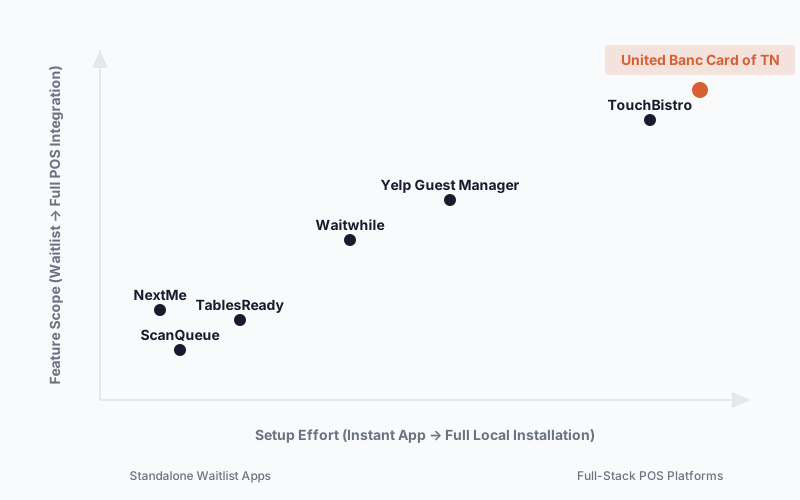
Speed of setup. If you need something running before Saturday's dinner rush, your options narrow fast. ScanQueue and TablesReady can be live in under an hour. Full POS platforms like Lavu (available through United Banc Card of TN) require onsite installation – typically 24–48 hours – but deliver far more capability once deployed.
Guest check-in method. The best tools today let guests join a waitlist by scanning a QR code on their phone – no app download required, no host data entry. Look for this as a minimum. Apps that still require hosts to manually enter every party add friction exactly where you don't want it.
Notification reliability. SMS and voice call notifications dramatically outperform buzzers for restaurants where guests wait in parking lots or nearby bars. Confirm whether SMS is included in the base plan or locked behind a paid tier – several platforms include QR check-in free but charge separately for text notifications.
Integration with your existing POS. If you already run Clover, Lavu, or Square, look for a waitlist tool that plugs into your existing floor plan and table status data. Standalone apps are faster to launch, but they don't know when a table actually turns – they're estimating. Native POS integrations know the moment a table is cleared.
Support model. SaaS apps offer email support and help centers. That works fine when things go smoothly. On a Saturday night when your system goes down, you want a real person who knows your setup. United Banc Card of TN's 24/7 local Tennessee support is a genuine differentiator for independent restaurants with no in-house IT.
Pricing model transparency. Per-cover fees (OpenTable) add up fast for high-volume restaurants. Flat monthly fees (ScanQueue, TablesReady, Waitwhile) are easier to budget. Bundled processing models (United Banc Card of TN) hide the cost in transaction rates – which may be lower or higher than standalone software depending on your card volume.
Scalability to full restaurant management. If you're running one café and just need to manage the Saturday brunch line, a lightweight app is the right call. If you're running multiple locations, need kitchen display integration, employee scheduling, and loyalty programs, a full POS platform becomes the more economical choice.
The Best Apps for Restaurant Waiting Times
1. United Banc Card of TN
United Banc Card of TN is a Tennessee-based merchant services and POS provider. It handles table management, payment processing, hardware, and 24/7 local support under one agreement – not a standalone waitlist app, but the right fit for restaurants that need waitlist management as part of a full operational upgrade.
Best for: Independent Tennessee restaurants, bars, and food trucks that need table management integrated with POS, payment processing, inventory, and local support – without juggling multiple vendors.
Strengths
- Full-stack bundle with free hardware: POS hardware and software provided at no upfront cost when paired with a merchant processing agreement; terminal rentals start at $8/month
- Onsite installation in 24–48 hours: Local Tennessee team handles setup, software programming, and staff training in person – not a help-center video
- Lifetime POS warranty: Most POS vendors offer 1-year limited warranties; United Banc Card of TN covers equipment for life
- Local 24/7 support from a named owner: Customers like Tim Harkum (Stirrup Nashville, customer since 2009) and Wacko Taco confirm Karl responds directly – "anytime we needed to talk to Karl, we just picked up the phone and he was right there for us"
- Multi-platform flexibility: Can deploy Lavu, Clover, Korona, or Retailcloud based on your restaurant type – not locked to one proprietary system
- Table management and waitlist via Lavu or Clover: Floor plan configuration, table status tracking, split-bill, and pay-at-table via QR code or tablet
Where it's not the right fit
- Not designed for restaurants that need a standalone waitlist app live within the hour – setup requires onsite visit
- Pricing requires a quote call; rates not published online
- Primarily Tennessee-focused (though nationwide merchant services is claimed)
Pricing: Free POS hardware and software with merchant processing agreement. Terminal rentals from $8/month. 30-day trial available. Processing rates require direct quote – call (615) 476-0255 or visit unitedbanccardoftn.com.
When to choose it: You're a Tennessee restaurant, bar, or food truck that's ready to consolidate POS hardware, software, payment processing, table management, and support under one local provider – and you want a named contact you can actually call when something breaks at 9 PM on a Friday.
2. ScanQueue
ScanQueue is a purpose-built QR code-based digital waitlist system designed for walk-in restaurants, where guests scan a code, enter their party details, and join the queue from their own phone – no host data entry, no app download required.
Best for: Walk-in focused restaurants, fast casual, brunch spots, and food trucks that want self-service check-in live within minutes.
Strengths
- QR code self-check-in eliminates host data entry entirely
- SMS and voice call notifications with a reported 95%+ answer rate vs. lower open rates for some demographics
- Permanent free tier available (up to 10 customers/day) – no credit card required
- Multi-service queues (e.g., separate bar and dining room lines)
- Real-time dashboard visible at host stand
Where it's not the right fit
- Not built for restaurants needing integrated POS, inventory, or labor management
- SMS notifications require paid Growth plan at $99/month
- No native reservation system – walk-in waitlist only at the base level
Pricing: Free tier (up to 10 customers/day). Growth plan $99/month (adds SMS, analytics). Pro plan $249/month (multi-location). No setup fees, cancel anytime. (Pricing as of 2025.)
When to choose it: You need a digital waitlist running before your next busy service and you want to test it with zero commitment. The five-minute setup and permanent free tier make this the lowest-friction entry point in the category.
3. Waitwhile
Waitwhile is a queue management and appointment scheduling platform that handles both reservations and walk-in waitlists in one interface – and it does both well, which is rarer than it sounds.
Best for: Full-service restaurants, fine dining, and venues that mix advance reservations with walk-in traffic and need both managed from a single screen.
Strengths
- Unified booking calendar and waitlist in a single platform
- 2-way SMS and email messaging
- Reported customer outcomes: 20% decrease in no-shows, 35% increase in satisfaction (per Waitwhile)
- G2 rating of 4.8/5 stars
- API and webhook integrations available on higher tiers
Where it's not the right fit
- Free tier is limited to 50 visits/month – fills quickly for any busy restaurant
- Not designed for operators who also need POS, inventory, or labor management
- Pricing scales with location count, which can get expensive for multi-site groups
Pricing: Free tier (50 visits/month). Starter from $23/month billed annually ($31/month monthly). Business tier from $55/month. Enterprise pricing available. (Pricing as of 2025.)
When to choose it: Your restaurant takes both reservations and walk-ins and you want one clean interface managing both – without committing to a full POS overhaul.
4. TablesReady
TablesReady is a digital waitlist and reservation tool with flat monthly pricing, no per-guest fees, and a free plan that actually covers enough volume for low-traffic operators to use it seriously.
Best for: Budget-conscious independent restaurants, small venues, and food trucks that need functional waitlist management without overcomplicating their tech stack.
Strengths
- QR code, website embed, and Reserve with Google check-in options
- SMS, 2-way texting, and WhatsApp messaging
- Square POS integration
- Estimated wait times and pick-up order management
- Described as "less than the cost of a lost buzzer or one host shift salary" – $39/month Starter plan
Where it's not the right fit
- Not designed for restaurants needing labor management, profit analytics, or kitchen display integration
- Limited integration ecosystem compared to full POS platforms
- Fewer advanced features than Waitwhile or Yelp Guest Manager
Pricing: Free plan (100 parties/month, 150 messages/month). Starter $39/month billed annually. 14-day free trial, no contracts. (Pricing as of 2025.)
When to choose it: You've been running a paper waitlist or pager buzzers and want to upgrade to digital without adding a new SaaS bill that costs more than your Saturday night bar tab.
5. NextMe
NextMe is a waitlist and queue management app for restaurants and service businesses that want something simple without a lot of setup. It also has the most generous free tier in this comparison.
Best for: Very small venues, single-location independents, and food trucks where fast setup and minimal learning curve matter more than deep analytics.
Strengths
- 170 visits/month on the free tier – more than double Waitwhile's 50 and TablesReady's 100 parties
- Self check-in via QR code, web link, or kiosk mode
- Virtual waiting room for guest engagement while they wait
- Bookings feature for managing appointments alongside walk-ins
- 14-day free trial on paid plans
Where it's not the right fit
- No mention of multi-location bulk pricing or enterprise-grade features
- Fewer integrations than larger platforms
- Not designed for full-service restaurants needing floor plan management or kitchen display
Pricing: Free tier (170 visits/month). Starter $49.99/month billed annually per location. Business $79.99/month billed annually per location. (Pricing as of 2025.)
When to choose it: You want the most generous free tier in this category to test digital waitlisting at your food truck or small café before committing to a paid plan.
6. Yelp Guest Manager
Yelp Guest Manager is a reservation and waitlist platform built into Yelp's consumer discovery network. Guests join the waitlist straight from your Yelp listing – no redirect required.
Best for: Restaurants in Yelp-heavy metro markets (casual dining, QSR) where converting Yelp discovery traffic into waitlist entries is the primary goal.
Strengths
- Guests join the waitlist from the restaurant's Yelp listing – no separate landing page needed
- AI-powered wait time prediction with up to 92% accuracy (per Yelp)
- No per-cover fees – restaurants that switched from OpenTable reportedly saved an average of $163/month
- Listed across Yelp, Google, Apple Maps, TikTok, Instagram, and Facebook from one dashboard
- 74 million monthly Yelp visitors – your listing is already in front of them
Where it's not the right fit
- Highest pricing in this comparison ($129–$899/month) – not cost-effective if your Yelp traffic is light
- No free tier; requires annual commitment at higher tiers
- Yelp-dependent: limited benefit for restaurants that don't attract meaningful Yelp search volume
Pricing: Guest Manager Starter $129–$349/month. Plus $149–$499/month. Premium $249–$899/month. Includes complimentary iPad and $300/month ad credit at some tiers. (Pricing as of 2025.)
When to choose it: Your restaurant appears prominently on Yelp, you're already spending on Yelp advertising, and you want to turn Yelp browsing directly into waitlist entries without redirecting guests elsewhere.
Quick Comparison
| Tool | Best For | Starting Price | Free Tier | Standout Feature |
|---|---|---|---|---|
| United Banc Card of TN | TN restaurants needing full POS + payments + support | Free hardware w/ processing ($8/mo terminal rental) | 30-day trial | Full-stack bundle: hardware, software, processing, onsite support, lifetime warranty |
| ScanQueue | Walk-in restaurants needing instant deployment | Free (10 guests/day) | Yes – permanent | QR self-check-in, zero host data entry, live in 5 minutes |
| Waitwhile | Mixed reservation + walk-in management | $23/mo (annual) | Yes – 50 visits/mo | Unified reservations + waitlist calendar, 4.8/5 G2 rating |
| TablesReady | Budget-conscious independents | $39/mo (annual) | Yes – 100 parties/mo | WhatsApp + SMS + 2-way texting; no contracts |
| NextMe | Small venues prioritizing simplicity | $49.99/mo (annual) | Yes – 170 visits/mo | Most generous free tier; virtual waiting room |
| Yelp Guest Manager | Yelp-traffic-heavy casual dining | $129/mo | No | Yelp listing integration; 92% wait time prediction accuracy |
Pricing as of 2025. Check each tool's pricing page for current rates.
Which App Should You Choose?
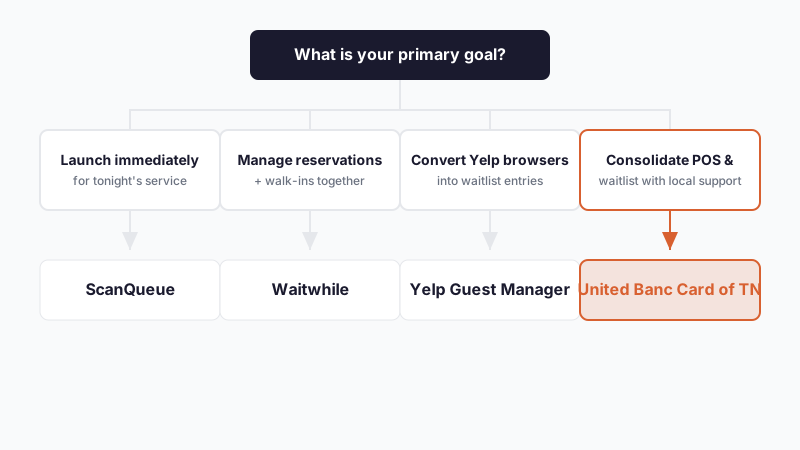
If you need something live before this weekend…
ScanQueue is the right call. Print a QR code, tape it to your host stand, and you're managing a digital waitlist tonight. The free tier handles up to 10 guests per day with no credit card required – enough to validate whether digital waitlisting changes your Friday flow before spending anything.
If your restaurant takes both reservations and walk-ins…
Waitwhile handles both from one interface without forcing you to manage two separate systems. The $23/month annual tier covers up to 10 locations and 2,500 visits per month – enough for most full-service independents.
If budget is the primary constraint…
TablesReady at $39/month (billed annually) gives you SMS notifications, 2-way texting, WhatsApp, QR check-in, and Square POS integration for less than the replacement cost of a broken pager. The free plan covers 100 parties and 150 messages per month – a real starting point for low-volume spots.
If you're a Tennessee independent restaurant ready to consolidate your entire POS, payment, and support stack…
United Banc Card of TN is built for this situation. POS hardware and software are included free when you sign up for merchant processing, onsite installation is typically completed in 24–48 hours, and you get a direct line to Karl and the local team – not a help center ticket. Stirrup Nashville has been a customer since 2009. That kind of retention doesn't happen with a national call-center model. Get a free quote at unitedbanccardoftn.com.
If your restaurant runs on Yelp traffic…
Yelp Guest Manager converts Yelp browsers directly into waitlist entries. If your listing drives meaningful foot traffic, the platform pays for itself through reduced per-cover fees compared to OpenTable ($163/month average savings reported by Yelp).
If you want the most generous free tier to test before committing…
NextMe offers 170 visits per month on its free plan – more than any other tool on this list. Start free, run it for a few weeks, and upgrade only when the volume demands it.
Ready to Try United Banc Card of TN?
If you're a Tennessee restaurant, bar, or food truck that's tired of managing separate vendors for POS hardware, software, payment processing, and support, United Banc Card of TN solves all of it in one call. POS hardware is included free with a merchant processing agreement, installation happens onsite in 24–48 hours, and the lifetime warranty means you're not calling a national support line when something breaks mid-service. Request a free quote at unitedbanccardoftn.com or call Karl directly at (615) 476-0255 – most restaurants are up and running within two business days.
Frequently Asked Questions
What should I look for in a restaurant waitlist app?
The best restaurant waitlist apps let guests self-check-in via QR code without downloading an app, send reliable SMS or voice notifications, and integrate with your existing POS to know when tables actually turn. Setup speed matters too – if you need something live today, ScanQueue deploys in five minutes, but full POS platforms like those available through United Banc Card of TN take 24–48 hours onsite but deliver far more integrated capability. Pricing model and support availability (email help center vs. 24/7 local support) also differ dramatically across the category, so match the tool to whether you're testing digital waitlisting or overhauling your entire operation. For independent Tennessee restaurants specifically, local support that responds directly is worth significant weight, because a Saturday night system failure costs money every minute it's down.
What is the difference between a standalone waitlist app and a full POS platform with table management?
Standalone apps like ScanQueue or TablesReady solve one problem – managing guest waits and notifications – with plug-and-play simplicity and no long-term commitment. Full POS platforms like those available through United Banc Card of TN integrate table management with payment processing, inventory tracking, labor scheduling, kitchen display, and local support under one vendor and one contract. A standalone app is faster to test (minutes vs. days) but doesn't know when a table actually clears because it's disconnected from your POS; a full platform knows the moment a table turns because floor plan and transaction data are unified. Choose standalone if you're testing digital waitlisting at low volume; choose full-stack if you're ready to consolidate multiple vendors and want local accountability.
Is a free restaurant waitlist app good enough, or do I need to pay?
Free tiers in this category are genuinely functional for testing – NextMe offers 170 visits per month, ScanQueue offers 10 per day, and TablesReady offers 100 parties per month. If your restaurant runs under that volume on a typical week, a free plan can be your permanent solution. However, most full-service restaurants and bars will hit the free ceiling within the first busy weekend; SMS notifications often move to a paid tier once you exceed the free message allotment. The question is not whether free is 'good enough' but whether the specific tool's free tier matches your volume – NextMe's 170 visits/month covers a casual small café; ScanQueue's 10 per day does not. When you're consolidating POS, processing, and support like United Banc Card of TN provides, the cost is bundled into processing rates rather than appearing as a monthly software fee, so 'free' isn't the right comparison – the comparison is whether bundled rates are lower than your current processing plus standalone waitlist app costs combined.
Can I integrate a restaurant waitlist app with my existing POS system?
Most modern standalone waitlist apps integrate with at least Square, and some integrate with Clover, Toast, or Lavu – but integration depth varies. ScanQueue, TablesReady, and NextMe offer native integrations, meaning they pull real-time table status from your POS so estimated wait times are based on actual table turns, not guesses. OpenTable and Yelp Guest Manager also integrate deeply with major platforms. However, if your current POS is outdated or unsupported by the app you choose, you're managing two disconnected systems – the waitlist app knows a guest is waiting, but it doesn't know when the table actually clears. United Banc Card of TN avoids this entirely by providing compatible POS hardware and software from the start (Lavu, Clover, Korona, or Retailcloud), so table management is built into the same system handling your payments and inventory. Before committing to any standalone app, confirm it natively integrates with your current POS; if not, a platform consolidation might be worth evaluating.
How much does a restaurant waitlist app typically cost per month?
Standalone QR-based waitlist apps range from free (ScanQueue at 10 guests/day, NextMe at 170 visits/month) to $99–$249 per month for paid tiers with SMS notifications and multi-location support. TablesReady starts at $39/month annual billing; Waitwhile starts at $23/month annual. Yelp Guest Manager is the most expensive at $129–$899/month depending on tier, but includes iPad hardware and advertising credits. United Banc Card of TN doesn't charge a separate monthly software fee – instead, the cost is bundled into merchant processing rates, with terminal rentals starting at $8/month; hardware is free when paired with a processing agreement. For a Tennessee restaurant making $50K/month in card sales at typical 2.8% processing rates, you're paying roughly $1,400/month in processing; whether United Banc Card of TN's bundled rates are higher, lower, or equal to your current processor plus a standalone waitlist app requires a direct quote. Most independent operators find that consolidating processing and waitlist under one vendor eliminates at least one separate monthly bill.
What is the fastest way to implement a restaurant waitlist system?
ScanQueue is the fastest in the category – you can print a QR code and launch a live waitlist in under five minutes with zero technical setup. TablesReady and NextMe are also rapid (under one hour) with QR code deployment and minimal configuration. Full POS platforms like those available through United Banc Card of TN require onsite installation, hardware setup, software programming, and staff training, which typically takes 24–48 hours. The trade-off is clear: if you need something running before tomorrow's dinner rush, use ScanQueue or print a TablesReady QR code today. If you can wait 1–2 business days and want waitlist management integrated with your entire POS, inventory, payments, and support, United Banc Card of TN's onsite approach actually speeds up your total operational upgrade because everything is installed and trained in one visit, not piecemeal. For Tennessee restaurants, that onsite installation also means Karl or the local team is there to answer questions in real time, not sending you to a help center video.
Does a restaurant waitlist app work without a smartphone or app download?
Yes – the best modern waitlist apps now support QR code check-in where guests scan with their existing phone camera and join the queue in a web browser, no app download required. ScanQueue, TablesReady, NextMe, and Waitwhile all offer this. Yelp Guest Manager guests can join directly from the Yelp listing without leaving the Yelp app. Some platforms also offer kiosk mode (a tablet at the host stand running check-in) and phone call check-in for guests who don't have smartphones. United Banc Card of TN's table management through Lavu or Clover includes floor plan mapping and pay-at-table QR code options, so guests can join via QR and later pay via QR without ever speaking to a staff member if they prefer. The oldest approach – host manually entering party details – is now considered friction and avoided by the better tools.
Can I use a restaurant waitlist app for takeout orders as well as dine-in waits?
Some tools are designed for both, and some are not. Waitwhile and TablesReady include 'pick-up order management' alongside waitlist features, so a guest can join the takeout queue just as they would a dine-in wait. ScanQueue and NextMe are primarily focused on walk-in dining waits, though they have booking features that can be adapted. Yelp Guest Manager handles both reservations and walk-in waits but is not primarily a takeout ordering tool. Full POS platforms like those available through United Banc Card of TN (Lavu, Clover, Retailcloud) integrate takeout ordering, online ordering through their own systems or third-party platforms like DoorDash and Grubhub, and dine-in table management all in one interface, which is why multi-concept restaurants (dine-in + takeout + delivery) often consolidate to a single POS rather than layering multiple apps. If takeout is a significant part of your revenue, confirm the standalone app you choose has explicit takeout queue management, or consider a full POS where all order types are unified.
Is a restaurant waitlist app necessary if I use OpenTable or Resy?
OpenTable and Resy are reservation platforms, not waitlist tools for walk-in guests. Many restaurants use both – OpenTable or Resy for advance bookings, and a waitlist app like ScanQueue, Waitwhile, or TablesReady for guests who show up without a reservation. Waitwhile explicitly handles both in one interface, so you don't need two separate systems. If your restaurant is reservation-only (fine dining, tasting menu), OpenTable or Resy alone may suffice. If you take walk-ins or have a hybrid model, a separate waitlist tool is necessary because OpenTable and Resy don't manage walk-in queues. United Banc Card of TN's POS platforms (Lavu and Clover) integrate with OpenTable and Resy so that reservation data syncs to your floor plan, and walk-in table management happens in the same POS – meaning you're not toggling between apps at the host stand. For Tennessee restaurants consolidating vendors, that unified approach eliminates the need to manage both OpenTable and a separate waitlist app.
Why is United Banc Card of TN on a list of restaurant waitlist apps if it's primarily a payment processor?
United Banc Card of TN is on this list because it bundles table management (via Lavu or Clover POS) with payment processing, hardware, and local 24/7 support – a package most independent waitlist apps do not offer. A restaurant choosing ScanQueue gets a specialist tool that solves one problem in five minutes; a restaurant choosing United Banc Card of TN gets table management as part of a complete operational overhaul that includes payments, inventory, labor, and a named local contact. The distinction matters because operators at different stages ask different questions: 'How do I test digital waitlisting today?' points to ScanQueue; 'How do I consolidate my POS, payments, and support under one vendor?' points to United Banc Card of TN. Waitlist management is one feature within United Banc Card of TN's full-stack offering, not the primary product, but it is a feature that directly solves the restaurant waiting time problem this page addresses. For Tennessee restaurants specifically, the local support and accountability (customers like Stirrup Nashville have been with United Banc Card of TN since 2009) is relevant to the decision because a failed waitlist deployment at 7 PM on a Saturday means you have a local person to call, not an email support ticket.
Is a standalone waitlist app still worth using if I'm considering switching POS systems?
Yes, but timing matters. If you're in the exploration phase and need to validate whether digital waitlisting improves your operations before committing to a full POS upgrade, a standalone app like ScanQueue or TablesReady is the right path – low cost, no long-term commitment, and you learn what features you actually need. Once you decide to switch POS systems, evaluate whether the new POS (Lavu, Clover, Toast, Retailcloud) includes native table management; if it does, discontinue the standalone app and use the POS feature instead because integration will be cleaner and you'll eliminate a separate subscription. United Banc Card of TN specifically includes table management in whatever POS platform they recommend (Lavu for restaurants, Clover for mixed retail and food, Korona for convenience stores), so a customer consolidating to United Banc Card of TN would discontinue ScanQueue or TablesReady and shift to the POS-native waitlist. The strategic decision is whether you're testing digital waitlisting (use standalone now) or optimizing your full stack (evaluate POS consolidation).
What happens to my waitlist data if I switch from one waitlist app to another?
Most modern waitlist apps can export historical guest wait times, party sizes, and no-show rates as CSV or JSON, but the data does not automatically transfer to a new platform – you'll need to request an export from your current provider and ask the new provider whether they can import it. Historical data rarely transfers cleanly because each platform structures data differently (ScanQueue may track 'wait duration in minutes,' Waitwhile may track 'guest satisfaction score,' and they don't always align). More importantly, the real value is not historical data but future prediction – modern apps use AI to estimate wait times based on current traffic patterns and your restaurant's turn rate, which resets when you switch platforms because the new system hasn't learned your specific patterns yet. For this reason, switching costs are low for standalone apps (you lose historical data but the new app starts learning immediately), but higher for full POS consolidation like United Banc Card of TN (because you're not just switching waitlist apps, you're migrating payment processing, inventory, labor scheduling, and customer data – which requires a real onboarding process). Plan to spend 24–48 hours on United Banc Card of TN's installation to capture all your data correctly; standalone app switches take minutes.
Does a restaurant waitlist app reduce no-shows and improve customer satisfaction?
Yes – platforms like Waitwhile report 20% decrease in no-shows and 35% increase in customer satisfaction when guests receive real-time SMS updates instead of guessing how long they're waiting. Yelp Guest Manager reports 92% accuracy in wait time prediction, which reduces guest frustration when the actual wait matches the estimate. ScanQueue and TablesReady both emphasize SMS reliability as the driver of this improvement because guests who receive a text saying 'Table ready in 12 minutes' are far more likely to stay in the restaurant or nearby parking lot than guests who receive a pager buzz they might miss. United Banc Card of TN's approach integrates SMS into the POS table management, so hosts at the host stand and management see the same guest queue and estimated times – reducing miscommunication about who's next. The data point that matters most is conversion: customers who know their wait and receive timely updates are less likely to leave before seating, which directly protects revenue. Test this with a free trial of ScanQueue or TablesReady for a few weeks and track your own no-show rate; most restaurants see measurable improvement within the first 10 days.
Can I manage multiple restaurant locations with a single waitlist app subscription?
Yes, most paid tiers of standalone waitlist apps support multiple locations – Waitwhile charges per location and can handle 10 locations on the $23/month tier; Yelp Guest Manager, TablesReady, and ScanQueue all offer multi-location pricing. However, each platform handles multi-location differently: some charge a flat fee regardless of how many locations you add, others charge per location per month. United Banc Card of TN's multi-location approach is different – instead of per-location software fees, the company bundles POS hardware, software, and processing into one account structure and manages all locations under a single merchant services agreement. For a restaurant group running 3–5 locations, consolidating to United Banc Card of TN typically costs less than maintaining separate SaaS subscriptions at each location because the processing rate covers the entire group. Compare the exact per-location cost of your current standalone app to what United Banc Card of TN quotes for multi-location processing and hardware to see which model fits your group structure.